Neo Sweet Color Grading Photoshop Actions: A Practical Guide
When you're working on a project that needs a specific mood, color is everything. It can make a design feel warm, cool, vintage, or hyper-modern. The challenge is achieving that perfect, consistent look without spending hours on manual adjustments. This is where a well-crafted tool like the Neo Sweet Color Grading Photoshop Actions comes in. It's not just a filter; it's a starting point for building a cohesive visual language across your photos and designs.
Understanding the Visual Style and Personality
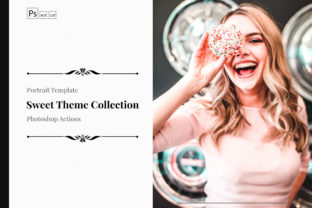
The Neo Sweet Color Grading collection offers a nuanced approach to color manipulation. It's designed to produce soft, slightly desaturated tones with a gentle lift in the shadows, creating a look that feels both contemporary and timeless. Think of the subtle warmth in a well-curated Instagram feed or the clean, inviting palette of a modern lifestyle brand. The personality here is approachable and refined—never harsh or overly dramatic. It's a style that works beautifully for portraits, product shots, flat lays, and interior photography, adding a layer of polish that feels professional yet natural.
What makes this particular set of Photoshop Actions valuable is its foundation in real-world photography. Developed by the team at 3Motional—practicing photographers and designers—the actions are built to enhance, not overpower. They respect the original image data, allowing for significant customization. You're not just applying a one-click effect; you're using a calibrated adjustment layer that you can tweak to suit the specific lighting and color profile of your shot. This flexibility is crucial for maintaining authenticity in your work.
Practical Applications Across Creative Projects
The real test of any design asset is how it performs in the wild. The Neo Sweet Color Grading actions find a natural home in several key areas:
- Brand Identity & Marketing: Consistency is king. Using these actions on all your brand photography—from website banners to social media posts—creates an instant visual signature. A cohesive color palette builds recognition and conveys professionalism, helping your audience immediately identify your content in a crowded feed.
- Editorial & Publishing: For bloggers, magazine layouts, or lookbooks, a unified color grade ties a series of images together, guiding the reader's eye and enhancing the narrative. It transforms a collection of separate photos into a single, polished story.
- E-commerce & Packaging Design: Product shots need to look appealing and true to life, yet also aspirational. The soft, sweet grading can make products feel more desirable while still accurately representing color and texture, which is vital for customer trust.
- Social Media Graphics & Content Creation: Standing out requires a distinct style. Applying a consistent color grade to your Reels, Stories, and static posts helps build a recognizable aesthetic that can increase engagement and follower loyalty.
It's also worth noting the ecosystem around this tool. 3Motional offers complementary resources like ACR Presets for Camera Raw and LUTs for video. This means you can achieve the same Neo Sweet look whether you're editing a photo in Photoshop, a batch of images in Lightroom, or a video in DaVinci Resolve or Final Cut Pro. This cross-platform consistency is a massive time-saver for anyone working in multimedia.
Integrating the Actions into Your Workflow
Adopting a new creative tool is about more than just installation; it's about integration. Here’s a practical approach to using the Neo Sweet Color Grading Photoshop Actions effectively:
- Evaluate Your Source Material: These actions work best on well-exposed images with a neutral or slightly warm white balance. Start with a clean edit—correct any major exposure or white balance issues first. The action is a finishing touch, not a rescue tool.
- Test and Tweak: After applying the action, don't stop there. Dive into the Layers panel. You'll find the adjustments are fully editable. Play with the opacity of the color layers, use masks to apply the effect selectively, or adjust the curves to better suit your specific image. The goal is to use the action as a guide, not a rigid rule.
- Build a System: Once you've found a setting you love, save it as a new action or a preset. Consider creating a few variations—a lighter version for airy portraits, a slightly deeper one for moody still life. This becomes your personal color grading toolkit.
- Consider the Pairing: Color grading interacts with typography and graphic elements. A sweet, soft palette pairs well with clean sans-serif fonts or elegant, lightweight serif fonts. It can clash with overly bold or distressed typefaces. Always view your graded photo within the context of your final layout—whether it's a website hero image, a social media graphic with text overlay, or a printed brochure.
Ultimately, the value of a resource like the Neo Sweet Color Grading Photoshop Actions lies in its ability to streamline a complex part of the creative process. It provides a professional foundation that saves time, ensures consistency, and elevates the overall quality of your visual projects. By understanding its style, testing its applications, and integrating it thoughtfully into your workflow, you can turn a simple action into a cornerstone of your brand's visual identity. It’s a practical design asset for any creator looking to add that final, polished layer of professionalism to their work.